You dictated it.
Then you rewrote it.
Not here.
You get the processed text on your Mac, and nowhere else.
macOS 14 or later, Apple Silicon (M1+). Intel Macs are not supported.
Live dictation, not a batch transcriber. You speak, the text lands at your cursor. It does not take existing audio files, so for hours of recorded interviews a batch tool fits better.
The complete app for 7 days, nothing locked. Then 19.99 € once.
Setup asks for two macOS permissions, microphone and accessibility. A third, automation, only if you use website rules or let it pause your music.
Recorded on a Mac. Nothing in these notes was typed.

Why Mac's built-in dictation isn't enough
It is free, it is built in, and it is genuinely decent. Here is where it stops.
It stops after 30 seconds of silence
Apple's own documentation: dictation ends when no speech is detected for 30 seconds. Dictato listens until you release the key, however long you need to think.
It punctuates. It does not structure.
Apple adds commas and periods. It will not break your text into paragraphs unless you say "new paragraph" out loud, will not drop your hesitations, and will not turn "twenty five euros" into 25 €.
It behaves the same everywhere
The same settings in Slack, in your editor and in a client letter. Dictato switches tone, language and engine on its own, per app and per website.
Press, speak, done
Six dictations, three languages, all landing as finished text.
What actually separates these apps
Plenty of Mac apps clean up your dictation. The three rows in bold are where they stop being alike: each one rules out a different app, and one column is still standing at the bottom.
| Dictato | Apple Dictation | Wispr Flow | superwhisper | VoiceInk | |
|---|---|---|---|---|---|
| Adds punctuation and paragraphs | Yes | No | Yes | Yes | Yes |
| …and does it offline | Yes | n/a | No | Yes | Yes |
| …with nothing else to install | Yes | n/a | n/a | Yes | Needs Ollama |
| …for under 20 €, paid once | 19.99 € | Free | 15 $/mo | 249.99 $ | 29 $ / 49 $ |
| Tone rewrite, offline | Yesone-time 3.4 GB model download | No | No | Yes | Via Ollama |
| Quota | None | None | 2,000/week free | None | None |
| Account required | No | No | Yes | No | No |
| Time limit | None | Stops at 30 s silence | None | None | None |
| Runs on | 1 Mac at a time, movable | All your Macs | All devices | Per licence | 1 Mac / 3 Macs |
Read the three bold rows in order. Working offline rules out Wispr Flow and every cloud app. Nothing else to install rules out VoiceInk, whose local pipeline needs you to set up Ollama yourself. Under 20 € rules out superwhisper, which does ship on-device models, at 249.99 $ for the lifetime licence.
* Subscription figures are the plans each vendor lists publicly, 10 to 15 € per month at the time of writing. Check their pages for the current price.
Everything runs on your Mac
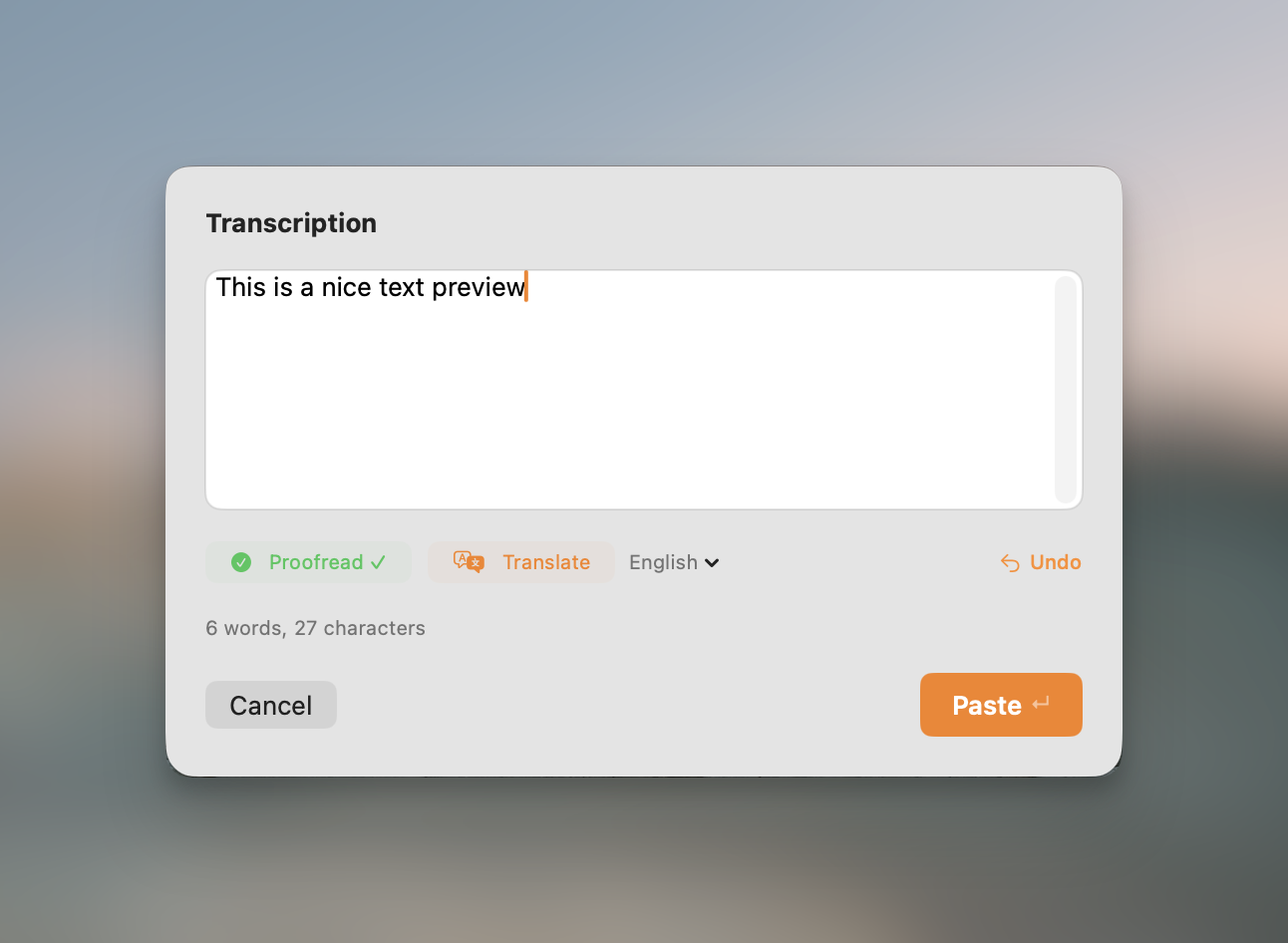
Raw speech comes out as clean text
Punctuation, capitals, paragraph breaks and filler words, handled before the text reaches your cursor. The model ships with the app and runs on the Neural Engine.
- "twenty five euros" becomes 25 €
- Dates, times and amounts formatted properly
- Nothing uploaded, even for the cleanup step
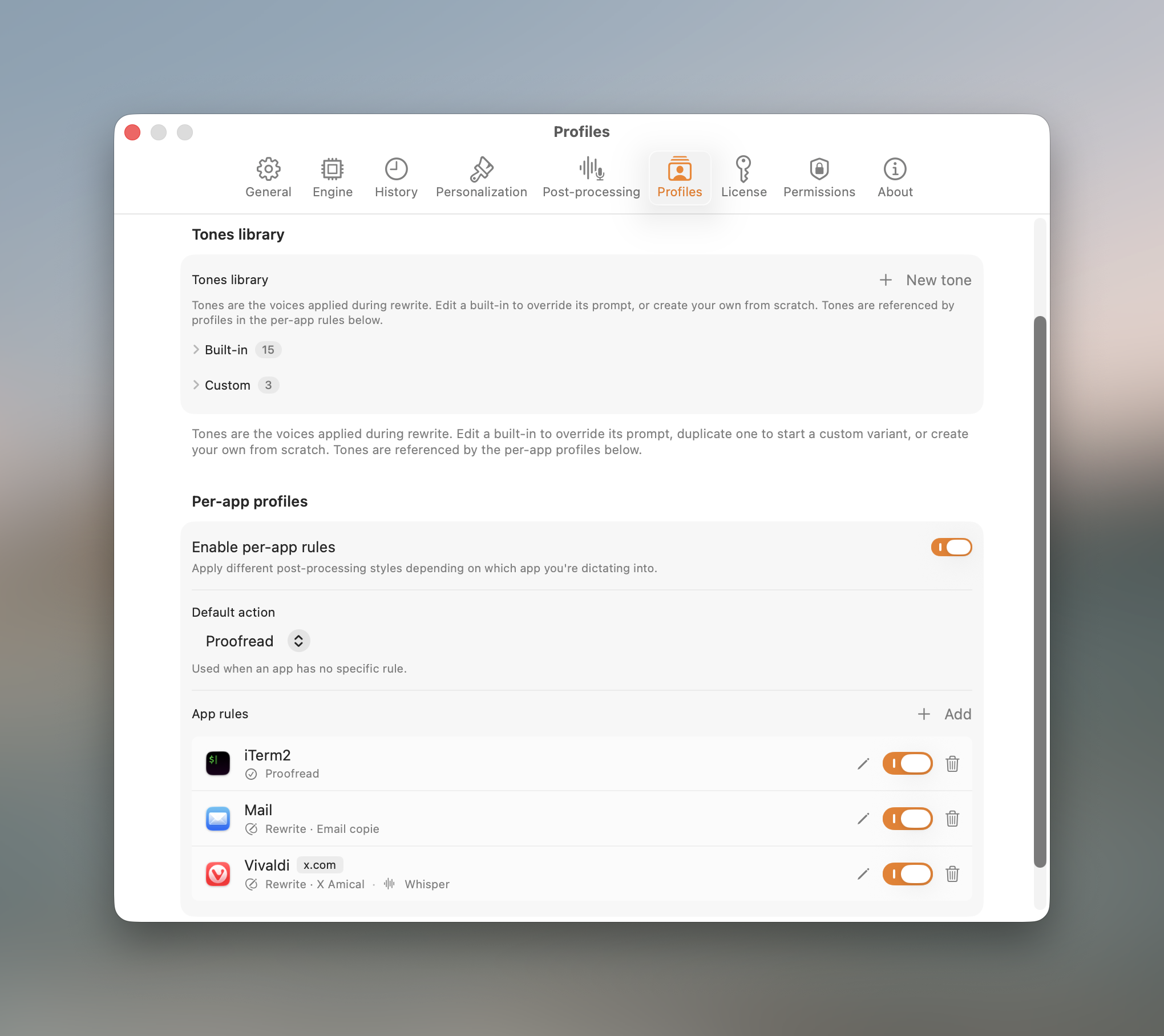
A different setup per app and per website
An email tone in Gmail, plain proofreading in your editor, verbatim in the terminal. Dictato switches on its own when you change window.
- Per-rule transcription engine and language
- Website rules in Safari, Chrome and Arc
- Nine built-in tones, or write your own
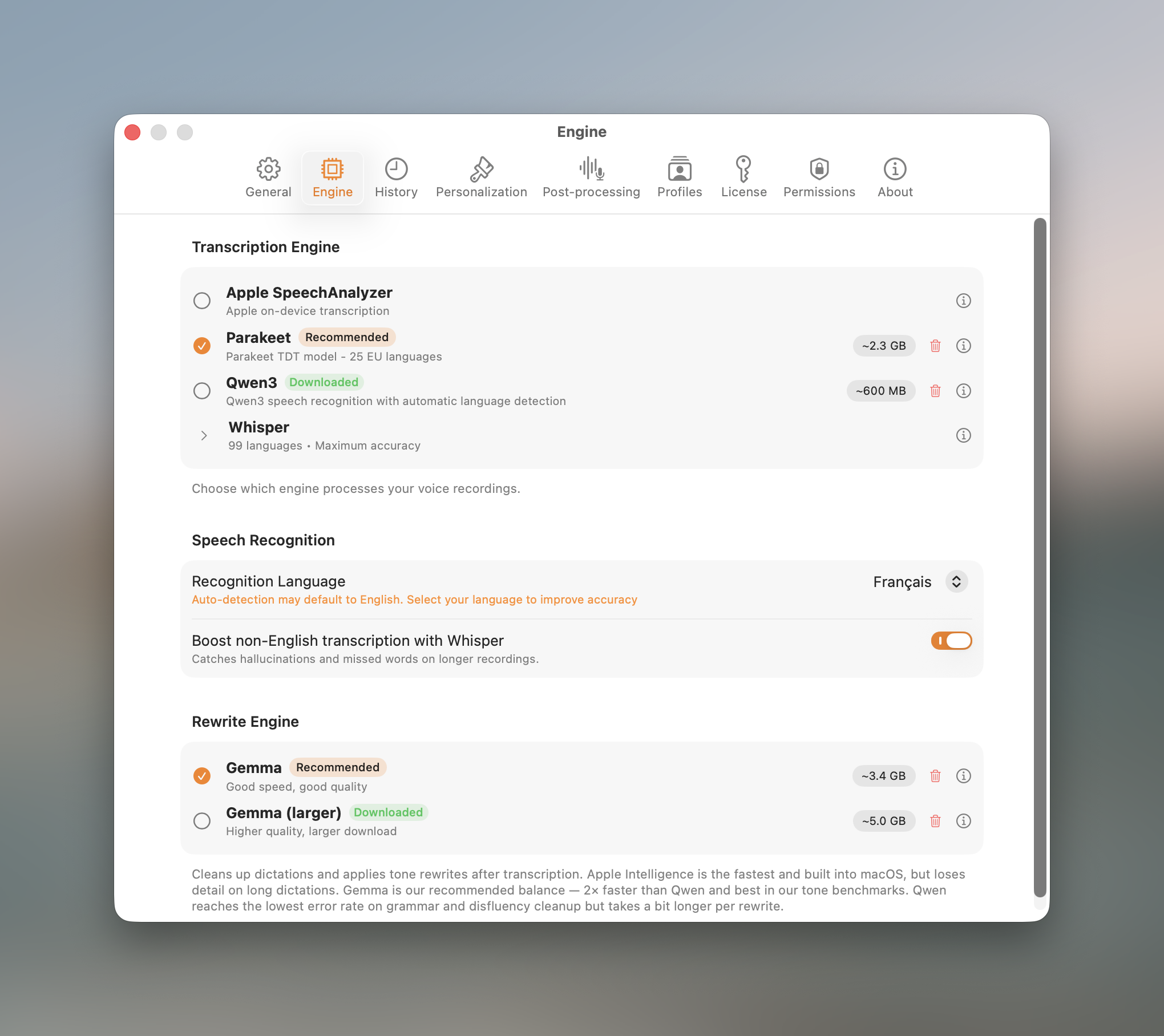
Four engines, and you never have to pick one
Nothing to pick on day one: Dictato starts on the engine your version of macOS runs best, and dictates. An engine is simply the model that does the listening, and swapping one changes how fast the text arrives and which languages are covered.
One is tuned for speed on Apple Silicon. One covers 99 languages, for the rare ones. One is a lighter multilingual option. The fourth lets macOS supply the model itself. Switch in one click and hear the difference on your own voice during the trial, or leave the default alone and never think about it.
The screen on the left is there if you ever want it. You never have to open it.
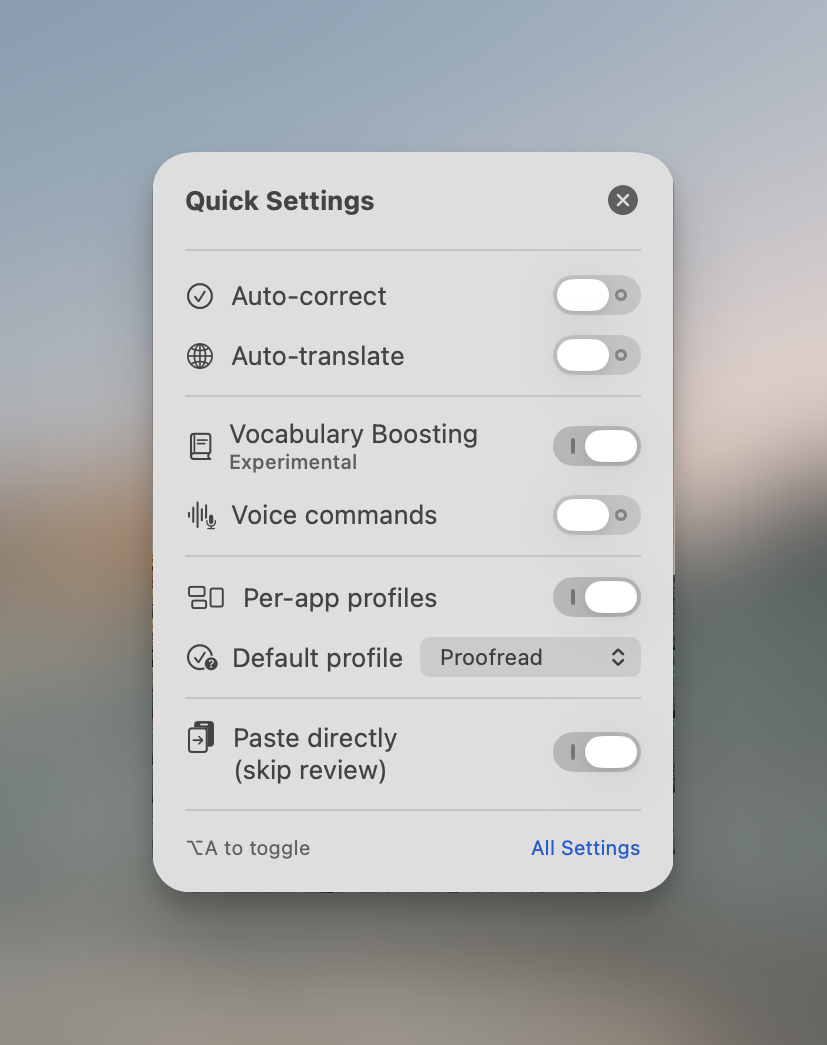
Change how it behaves without leaving what you are doing
One shortcut opens a small panel over your current app. Flip auto-correct off for a code block, turn translation on for one reply, switch the default profile, then keep typing.
- Auto-correct and auto-translate, one toggle each
- Vocabulary boosting and voice commands
- Paste directly, to skip the review window
Every dictation, kept on your machine
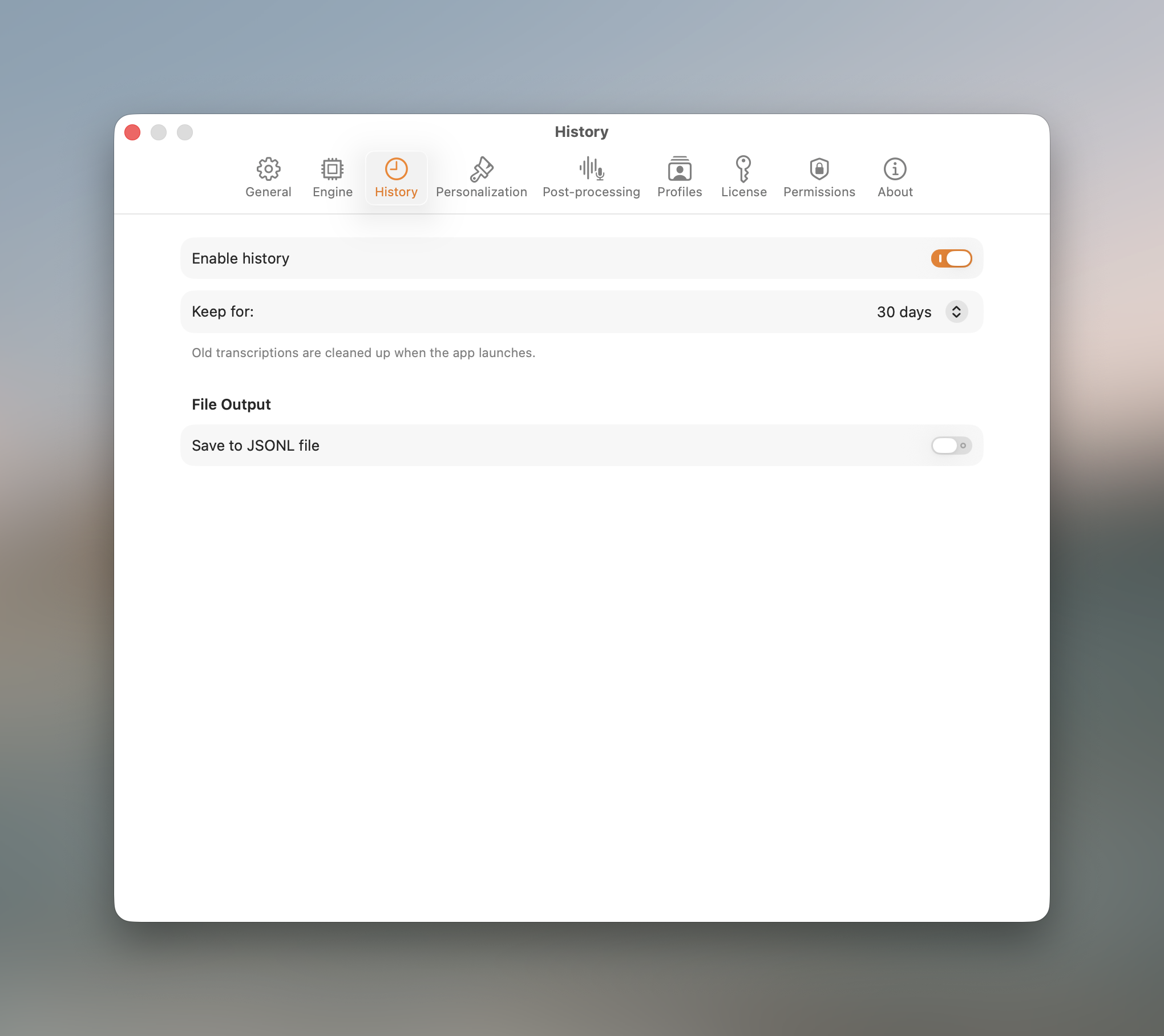
Search what you dictated last Tuesday, copy the raw version or the cleaned one, delete the lot in one click. Stored locally, never synced.
- Replay the audio, unfold the original transcript
- The audio is kept too, on your Mac, and you can switch that off
- Full-text search across everything
Most people don't speak in finished sentences
Developers
Prompts, commit messages, code review comments. Dictate into the terminal, the editor, and the AI chat without leaving the keyboard.
Read the developer guide →Writers
Get the first draft out at speaking speed, then edit. No time limit, no sentence cut short because you paused to think.
Read the writers guide →Students
Lecture notes, essay drafts, reading summaries. Works in Notion, Word, Google Docs and Obsidian alike.
Read the student guide →Clinicians and lawyers
No audio and no patient data ever leaves your Mac, so there is no third-party data flow and no Business Associate Agreement to chase. That removes the usual obstacles, it is not a certification: read the brief before adopting it for regulated work.
Read the healthcare and legal brief →How much Dictato costs
Once. That is the whole pricing page.
- ✓7-day free trial
Full app, no credit card, no feature locked - ✓Unlimited dictation
No time limit, no word cap, no fair-use clause - ✓All four engines
Plus proofread, tones, translation and profiles - ✓Lifetime updates
Pay once. No renewal, ever. - ✓One Mac at a time, yours to move
Change machine whenever you want, up to 3 moves per 30 days. Repairs and hardware swaps included. - ✓14-day refund
No questions asked, VAT included in the price
macOS 14+, Apple Silicon, one Mac at a time
What the subscription apps cost you instead
| Dictato, forever, one Mac | 19.99 € |
| A 12 €/month app, year 1 | 144 € |
| Same app, year 3 | 432 € |
| Same app, year 5 | 720 € |
| You keep | 700 € over 5 years |
And when you stop paying them, you stop dictating: Dictato keeps working offline, forever, on the Mac it is licensed to.
What Dictato users say
★★★★★4.7 / 5 from 9 verified reviews
“I had a problem with the software. Over several emails, we traded technical information. The problem got resolved in the next release. I'm impressed with their responsiveness. Excellent.”
“Thanks so much for diving into this! Keep up the good work!”
“Combining the Whisper Large package with the Gemma rewrite engine yields excellent text output.”
“Fantastisches Tool mir bei meiner Eingabe beim Mac zu helfen. Die Diktierfunktion hatte dort immer Probleme, weil ich viele englische Begriffe in der deutschen Sprache habe. Hier läuft alles fantastisch. Selten, dass ich einmal nachkorrigieren muss. ”
“Thanks very much for your promptness in addressing this. Happy to support your app, it fits my use case perfectly.”
“I’ve been using it every day for almost three months. It has improved a lot since the beginning; now it makes very few mistakes, and even when I pause in the middle of a sentence (because I need to think about how to continue), it doesn’t end the sentence with a period. At first, that used to force me to make edits, but now corrections are truly rare.”
Questions people actually ask
Apple punctuates. It does not structure. You get one block to break into paragraphs yourself, and it behaves the same in every app. Dictato adds the sentence breaks and the paragraphs for you from the first dictation, and can follow a different rule in Slack than in your editor. Both run on your Mac, so the difference is not privacy, it is what lands at your cursor.
Dictato sits in the menu bar. Hold one key, speak, release. If holding a key is awkward, or impossible, switch the recording mode to Toggle in Settings: one press starts, another stops. The audio goes to a model running on your Mac and the finished text lands where your cursor already is. No window to open, nothing to copy and paste. See the guide to dictating into any app.
You do not have to choose one to get started, and the engine is just the model that does the listening. Dictato picks the right one for your Mac and you can change it later in one click.
On macOS 26 and later with Apple Intelligence turned on, you get Apple SpeechAnalyzer: it is part of the system, so nothing ships with Dictato and macOS installs your language on first use. On macOS 14 and 15, and on macOS 26 with Apple Intelligence off, you get Parakeet, an on-device model tuned for speed on Apple Silicon, 24 languages, mostly European. The other two are there when you need them: Whisper if your language is not among those 24, since it covers 99, and Qwen3 for a lighter multilingual option on macOS 15 and later. If you want the numbers rather than the names, the engine comparison tests all of them on the same audio.
It depends on the engine. Whisper is the widest with 99 languages, from French and German to Japanese, Chinese and Arabic. Parakeet covers 24, mostly European, Qwen3 26. Whisper and Qwen3 detect the language on their own; with Parakeet and Apple's engine, picking your language in Settings gives you better accuracy.
If you can paste into it, Dictato works. Gmail, Slack, VS Code, Xcode, Notion, Obsidian, Pages, Word, Google Docs, Discord, Teams. Dictato pastes at your cursor with a simulated Cmd+V, which is why macOS asks for Accessibility permission, and it restores whatever was in your clipboard afterwards. The app needs no dictation support of its own.
In the menu bar at the top of the screen, not the Dock. Click its icon to open the panel, where you can start a recording or jump to History and Settings. Day to day you never open it: you hold your hotkey and speak.
That permission is what lets Dictato paste into other apps, and macOS also requires it to capture your hotkey, so dictation does not start without it. You grant it once and the setup assistant walks you through it. Dictato also needs Microphone access to record, and Automation access for two things: per-website rules, and pausing Spotify or Apple Music while you speak.
Auto-correct cleans what you said without changing your words: grammar, punctuation, capitals, paragraph breaks. It is on from the first dictation. It runs on macOS 26 with Apple Intelligence, or on Dictato's own downloadable model; on macOS 14 and 15 with neither, you still dictate and still get the deterministic cleanup, without the model pass. A tone goes further and rewrites the same thought into a style, such as a polished email, a short note, or a bullet list. Use auto-correct for a tidy transcript, a tone when you want the text reshaped. Both run on your Mac.
Not for dictation itself, and not for tones. Tone rewrites run on Gemma, a model Dictato downloads once (about 3.4 GB) and keeps on your Mac. Apple Intelligence powers auto-correct, and auto-translate uses Apple's own Translation framework; both need macOS 26. Without any of that you can still dictate, and still use the deterministic cleanup, the voice commands and the vocabulary.
Add them to the Vocabulary section in Settings. With Whisper, the Context field steers the transcription itself; with Parakeet, switch on vocabulary boosting in the same panel. For anything short, or when you want an exact result every time, map the spoken phrase to the exact replacement, or to an emoji, with a Voice Command. The manual covers both.
Yes, that is what Profiles do, once you switch them on in Settings. Each app, and each website in Safari, Chrome, Brave, Edge, Arc, Vivaldi and Opera, gets its own behavior: a casual tone in Slack, an email tone in Gmail, plain proofreading in your editor, or untouched verbatim text where you need exactly what you said. A rule can even pin its own transcription and rewrite engine. Firefox gets app-level rules rather than per-site ones. See how profiles work.
Your dictation never leaves the Mac. Audio goes from the microphone to the on-device model, and Dictato keeps the recording and the text in your local History so you can play a dictation back. Both stay on your Mac, and you can switch either off or delete them at any time. No analytics on what you dictate, and nothing we can read.
Dictato talks to one server of ours, app.dicta.to, and it is the only address the app reaches on its own. With a licence, that is a single check when the app starts, carrying a machine identifier and your app and macOS versions, nothing else, and nothing more until the next launch. During the free trial the same domain is contacted more often, at launch, then every 30 minutes while the app is running and when your Mac wakes, because that is what counts the seven days down. It carries plain counters: how many times the app launched, how long before your first dictation, how many injections failed. Integers and fixed labels, never any audio and never any transcript, and you can switch it off in Settings. It stops for good the day you activate a licence. Update checks go to app.dicta.to as well, once at launch and every 12 hours after that. The feedback forms send what you type into them, and only when you press send.
The one other connection is downloading a model. Those come from huggingface.co, once per model, at the moment you pick an engine or a tone model that needs one, and never again afterwards. So if you watch Dictato with Little Snitch, those two names are what you will see. The privacy guide goes through it in detail.
Everything is transcribed on your own Mac, so no audio and no protected health information ever reaches a third party. There is no Business Associate Agreement to sign, because there is no Business Associate to begin with.
Two things to configure first: Dictato keeps a local History with the audio of each dictation, which you can switch off, and it pastes through the system clipboard, so review any clipboard manager you run. Being clear about the limits: Dictato is not a certified HIPAA-compliant solution, we do not sign BAAs and we have not undergone a formal compliance audit. Check with your compliance officer before adopting any tool for regulated work. More detail on the healthcare and legal page.
macOS 14 (Sonoma) or later on Apple Silicon, M1 or newer. Intel Macs are not supported. Parakeet needs about 485 MB of disk, Whisper 245 MB to 3.1 GB depending on the model you pick, Qwen3 about 600 MB. Apple's engine ships no model of its own, macOS installs the locale for you. Tone rewrites add a one-time 3.4 GB download. Expect the app to hold 2 to 3 GB of RAM while an engine is loaded.
Seven days, full app, no credit card. Download it, use it for a week, pay only if you keep it. That is long enough to try every engine your Mac supports in your own apps. If you buy and change your mind, there is a 14-day refund with no questions asked.
No. 19.99 € once, for life. No monthly fee, no renewal, no limit on how much you dictate. Updates are included for as long as we keep developing Dictato, and since every engine runs on your Mac there is no transcription server and no API key to pay for.
A licence runs on one Mac at a time. You can move it whenever you want: install Dictato on the other Mac, enter the same key, and it activates there while the first one stops being the licensed machine. You get up to 3 moves per 30 days, which covers a repair, a hardware swap, or a trip where you need it on a second Mac. Need both Macs live at the same time? Write to us and we will sort it out.
It depends on what you optimise for. If you want text produced on your own machine, with a cleanup pass you can switch on, Dictato is built for that: four engines, any app, no word limit, paid once. Apple's is free and runs on device, but it punctuates without structuring and behaves identically everywhere. Dragon Professional for Mac was discontinued by Nuance in 2018. Cloud tools add speaker labels but need an account and a subscription. Full roundup in the best dictation apps for Mac in 2026.
The engine comparisons people come for
Parakeet vs Whisper vs Apple Speech on Mac
All three local engines tested on the same audio. Latency, accuracy, language coverage, and which one to leave on.
Read → ComparisonSpeech-to-text engine comparison, Mac 2026
Every engine that runs locally on Apple Silicon, measured rather than guessed.
Read → GuideGetting Parakeet running on a Mac
NVIDIA ships it as a research model, not an app. Here is how it actually gets on your machine.
Read →Say your next paragraph out loud. Then read it.
Seven days, the whole app, nothing locked. 19.99 € after that, once, for life.
Download for Mac, free for 7 daysmacOS 14+, Apple Silicon, 14-day refund